Example plotting following ASP Docs jitter_solve ASTER example for ASTER with Jitter Correction#
Below are example asp_plot outputs following the processing in the ASP Docs jitter_solve ASTER example.
Before exploring this example, be sure you can produce mapprojected outputs and DEMs with this notebook.
We diverge from the documentation example data, instead retrieving the example data used in https://github.com/uw-cryo/asp_tutorials:
Note on ASTER L1A data format change: In December 2025, NASA decommissioned the ASTER L1A Version 003 product (distributed as a
.zipof GeoTIFF images and text geometry files) and replaced it with Version 004 (distributed as a single HDF-EOS2.hdffile). The Zenodo archive below preserves the old V003 format. If you are downloading new ASTER data from NASA Earthdata, you will receive V004 HDF files instead. Both formats are supported byaster2asp(HDF support requires ASP build 2026-01-28 or later). See the aster2asp documentation for details.
Option A: V003 data from Zenodo (legacy format)
wget https://zenodo.org/record/7972223/files/AST_L1A_00307312017190728_20200218153629_19952.zip

mkdir dataDir

tar xvf AST_L1A_00307312017190728_20200218153629_19952.zip -C dataDir
Option B: V004 data from NASA Earthdata (current format)
Download an ASTER L1A .hdf file from NASA Earthdata.
Pre-process the images for stereo:
# For V003 directory input:
aster2asp dataDir -o out

# For V004 HDF input:
aster2asp input.hdf -o out
Both produce the same output:
out-Band3B.tif
out-Band3B.xml
out-Band3N.tif
out-Band3N.xml
We download Copernicus 30 m reference DEM data, using: https://github.com/uw-cryo/fetch_dem:
You will need to request your own OpenTopography API key to add to this command as the argument to
-apikey.You will also need the output of mapprojection from the previous notebook to use
out-Band3B_proj.tifas the extent argument to-raster_fn.
Once you have that prepared:
python download_global_DEM.py \
  -demtype COP30 \
  -raster_fn out-Band3B_proj.tif \
  -out_fn cop30.tif \
  -apikey [OPEN_TOPOGRAPHY_API_KEY]
Then adjust the vertical reference to attain a reference DEM relative to the WGS84 ellipsoid:
dem_geoid --geoid egm2008 --reverse-adjustment cop30.tif

mv cop30-adj.tif ref.tif
And then blur the reference dem per the docs with:
dem_mosaic --dem-blur-sigma 2 ref.tif -o ref_blur.tif
Run initial bundle adjustment:
bundle_adjust -t aster          \
  --aster-use-csm               \
  --camera-weight 0.0           \
  --tri-weight 0.1              \
  --tri-robust-threshold 0.1    \
  --num-iterations 50           \
  out-Band3N.tif out-Band3B.tif \
  out-Band3N.xml out-Band3B.xml \
  -o ba/run
Run mapprojection:
Note: The ASTER scene is from Mt. Rainier in Washington State, so the local stereographic projection uses (-121.7603, 46.8523) as the (lon, lat):
proj='+proj=stere +lat_0=46.8523 +lon_0=-121.7603 +k=1 +x_0=0 +y_0=0 +datum=WGS84 +units=m +no_defs'

mapproject -t csm                       \
 --tr 15 --t_srs "$proj"                \
  ref_blur.tif out-Band3N.tif           \
  ba/run-out-Band3N.adjusted_state.json \
  out-Band3N.map.tif

mapproject -t csm                       \
 --tr 15 --t_srs "$proj"                \
  ref_blur.tif out-Band3B.tif           \
  ba/run-out-Band3B.adjusted_state.json \
  out-Band3B.map.tif
Run stereo processing and DEM generation:
parallel_stereo                         \
  --stereo-algorithm asp_bm             \
  --subpixel-mode 1                     \
  --max-disp-spread 100                 \
  --num-matches-from-disparity 100000   \
  out-Band3N.map.tif out-Band3B.map.tif \
  ba/run-out-Band3N.adjusted_state.json \
  ba/run-out-Band3B.adjusted_state.json \
  stereo_bm/run                         \
  ref_blur.tif

point2dem --errorimage --t_srs "$proj" \
  --tr 15 stereo_bm/run-PC.tif         \
  --orthoimage stereo_bm/run-L.tif
The results of this first part are displayed below.
Result of stereo before correction for jitter#
Example plots showing the outputs prior to jitter correction.
directory = "~/Desktop/asp-plot-examples/aster_jitter/"
bundle_adjust_directory = "ba/"
stereo_directory = "stereo_bm/"
reference_dem = f"{directory}ref.tif"
Processing Parameters#
%load_ext autoreload
%autoreload 2

from asp_plot.processing_parameters import ProcessingParameters
processing_parameters = ProcessingParameters(
    processing_directory=directory,
    bundle_adjust_directory=bundle_adjust_directory,
    stereo_directory=stereo_directory
)
processing_parameters_dict = processing_parameters.from_log_files()

print(f"Processed on: {processing_parameters_dict['processing_timestamp']}\n")

print(f"Reference DEM: {processing_parameters_dict['reference_dem']}\n")

print(f"Bundle adjustment ({processing_parameters_dict['bundle_adjust_run_time']}):\n")
print(processing_parameters_dict["bundle_adjust"])

print(f"\nStereo ({processing_parameters_dict['stereo_run_time']}):\n")
print(processing_parameters_dict["stereo"])

print(f"\nPoint2dem ({processing_parameters_dict['point2dem_run_time']}):\n")
print(processing_parameters_dict["point2dem"])
Processed on: 2025-11-17 15:41:15

Reference DEM: ref_blur.tif

Bundle adjustment (0 hours and 0 minutes):

bundle_adjust -t aster --aster-use-csm --camera-weight 0.0 --tri-weight 0.1 --tri-robust-threshold 0.1 --num-iterations 50 out-Band3N.tif out-Band3B.tif out-Band3N.xml out-Band3B.xml -o ba/run

Stereo (0 hours and 3 minutes):

stereo --stereo-algorithm asp_bm --subpixel-mode 1 --max-disp-spread 100 --num-matches-from-disparity 100000 out-Band3N.map.tif out-Band3B.map.tif ba/run-out-Band3N.adjusted_state.json ba/run-out-Band3B.adjusted_state.json stereo_bm/run ref_blur.tif --corr-seed-mode 1 --sgm-collar-size 0 --compute-point-cloud-center-only --threads 8

Point2dem (0 hours and 0 minutes):

point2dem --t_srs "+proj=stere +lat_0=46.8523 +lon_0=-121.7603 +k=1 +x_0=0 +y_0=0 +datum=WGS84 +units=m +no_defs" --tr 15 stereo_bm/run-align-trans_reference.tif
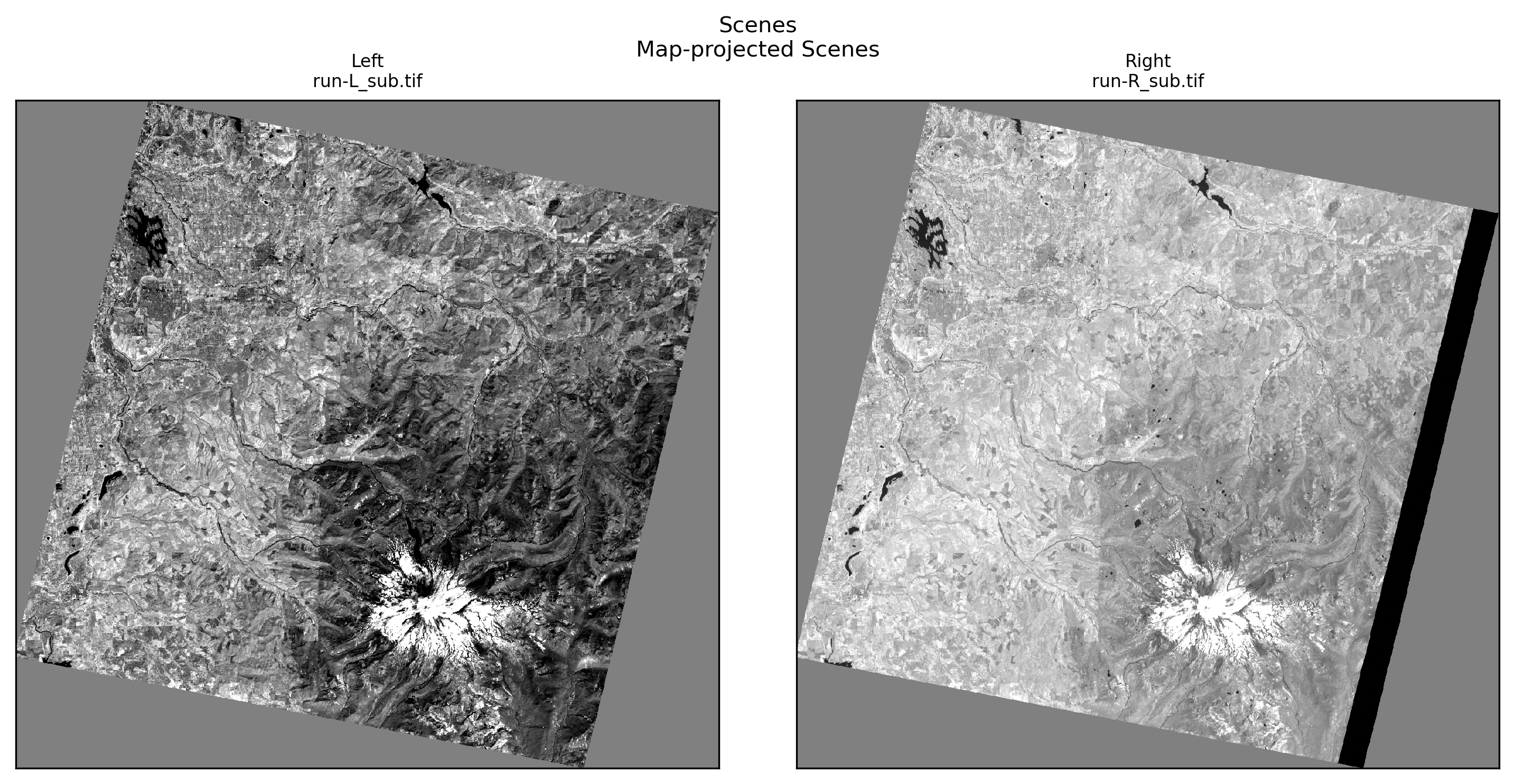
Scene Plots#
from asp_plot.scenes import ScenePlotter
plotter = ScenePlotter(
  directory,
  stereo_directory,
  title="Scenes"
)

plotter.plot_scenes()
Bundle Adjustment Plots#
import contextily as ctx
from asp_plot.bundle_adjust import ReadBundleAdjustFiles, PlotBundleAdjustFiles
map_crs = "EPSG:4326"

ctx_kwargs = {
    "crs": map_crs,
    "source": ctx.providers.Esri.WorldImagery,
    "attribution_size": 0,
    "alpha": 0.5,
}
ba_files = ReadBundleAdjustFiles(directory, bundle_adjust_directory)
resid_initial_gdf, resid_final_gdf = ba_files.get_initial_final_residuals_gdfs(residuals_in_meters=True)
WARNING:asp_plot.bundle_adjust:

Could not read stereopair metadata to get mean GSD. Residuals will remain in pixels.


WARNING:asp_plot.bundle_adjust:

Could not read stereopair metadata to get mean GSD. Residuals will remain in pixels.
More than two XML files found in directory. Mosaicking before proceeding.


More than two XML files found in directory. Mosaicking before proceeding.
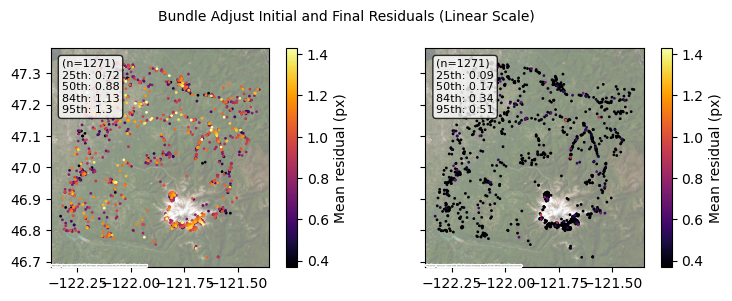
plotter = PlotBundleAdjustFiles(
  [resid_initial_gdf, resid_final_gdf],
  lognorm=False,
  title="Bundle Adjust Initial and Final Residuals (Linear Scale)"
)

plotter.plot_n_gdfs(
    column_name="mean_residual",
    cbar_label="Mean residual (px)",
    map_crs=map_crs,
    **ctx_kwargs
)
Stereo Plots#
from asp_plot.stereo import StereoPlotter
plotter = StereoPlotter(
  directory,
  stereo_directory,
  reference_dem=reference_dem,
)
WARNING:asp_plot.utils:Could not find ('*-align-L.txt',) in /Users/ben/Desktop/asp-plot-examples/aster_jitter/stereo_bm/. Some plots may be missing.
WARNING:asp_plot.utils:Could not find ('*-align-R.txt',) in /Users/ben/Desktop/asp-plot-examples/aster_jitter/stereo_bm/. Some plots may be missing.
Reference DEM: /Users/ben/Desktop/asp-plot-examples/aster_jitter/ref.tif


ASP DEM: /Users/ben/Desktop/asp-plot-examples/aster_jitter/stereo_bm/run-DEM.tif
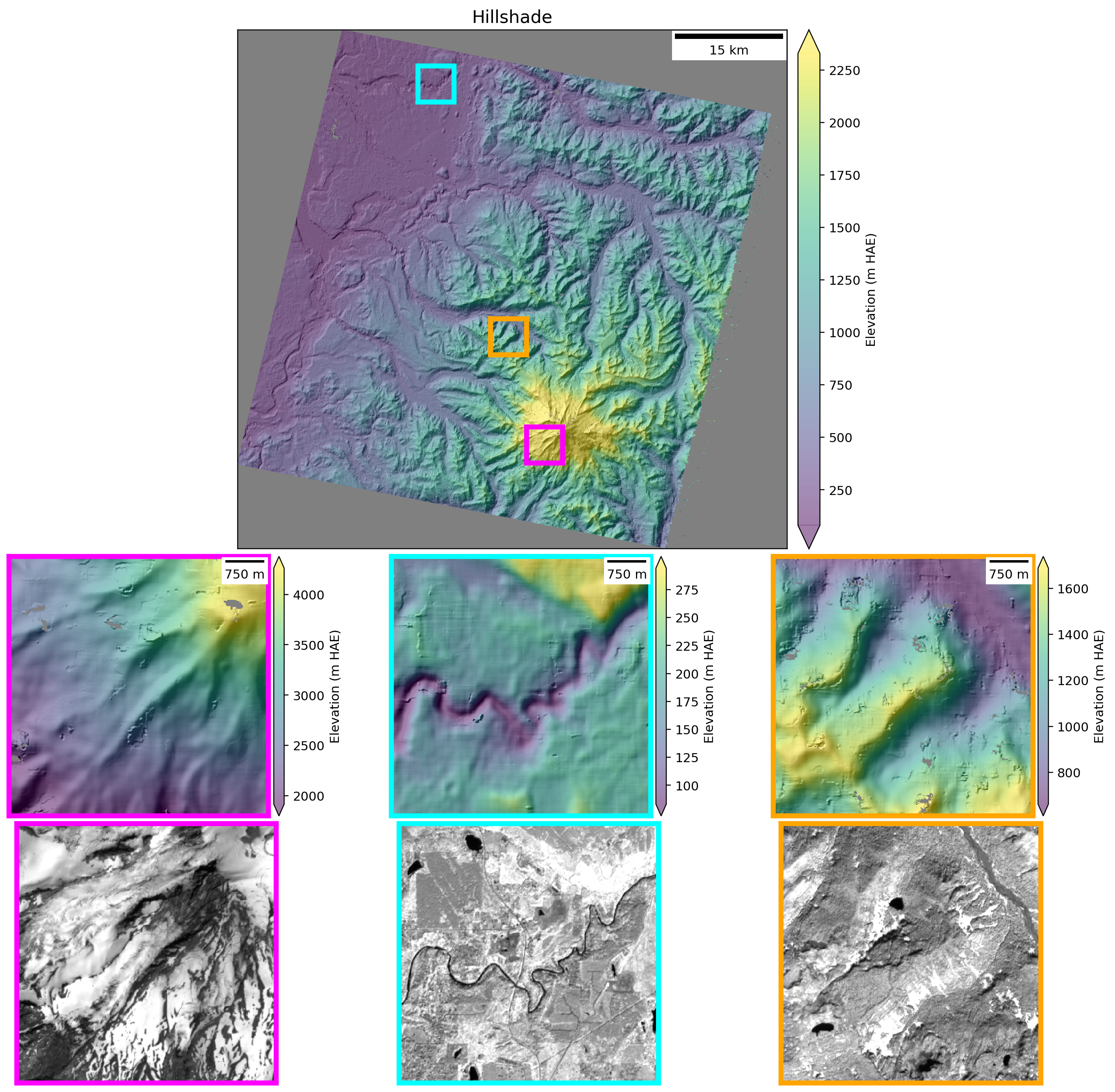
plotter.title = "Hillshade"

plotter.plot_detailed_hillshade(
  subset_km=5
)
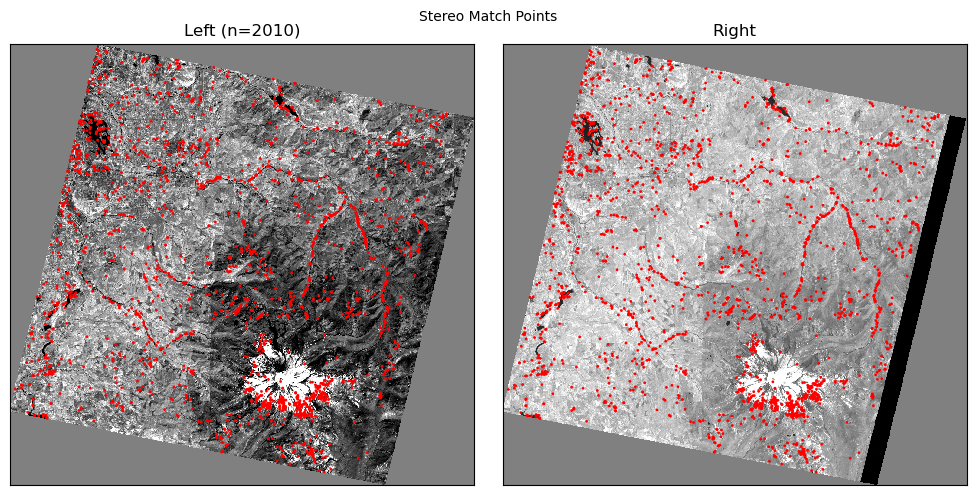
plotter.title="Stereo Match Points"

plotter.plot_match_points()
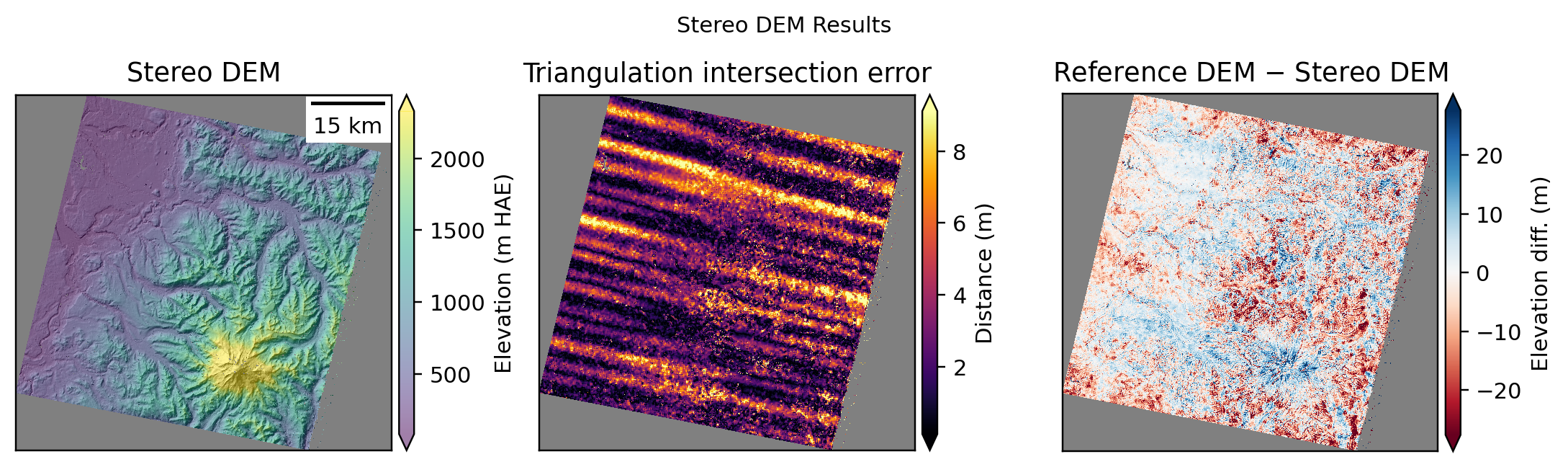
plotter.title = "Stereo DEM Results"

plotter.plot_dem_results()
Plotting DEM results. This can take a minute for large inputs.
WARNING:asp_plot.stereo:

Found a DEM of difference: /Users/ben/Desktop/asp-plot-examples/aster_jitter/stereo_bm/run-diff.tif.
Using that for difference map plotting.
Jitter Correction#
Following the initial stereo results, we continue with the ASP docs example commands:
Align the initial DEM to the COP30 reference and create the aligned DEM:
pc_align --max-displacement 50          \
  stereo_bm/run-DEM.tif ref.tif           \
  -o stereo_bm/run-align                  \
  --save-inv-transformed-reference-points

point2dem --t_srs "$proj" --tr 15 \
  stereo_bm/run-align-trans_reference.tif
Then take the difference:
geodiff stereo_bm/run-align-trans_reference-DEM.tif \
  ref.tif -o stereo_bm/run
Apply another bundle adjustment step:
bundle_adjust -t csm                        \
  --initial-transform                       \
  stereo_bm/run-align-inverse-transform.txt \
  --apply-initial-transform-only            \
  out-Band3N.map.tif out-Band3B.map.tif     \
  ba/run-out-Band3N.adjusted_state.json     \
  ba/run-out-Band3B.adjusted_state.json     \
  -o ba_align/run
Solve for jitter:
mkdir -p jitter

cp stereo_bm/run-disp-out-Band3N__out-Band3B.match \
  jitter/run-out-Band3N__out-Band3B.match

jitter_solve out-Band3N.tif out-Band3B.tif        \
  ba_align/run-run-out-Band3N.adjusted_state.json \
  ba_align/run-run-out-Band3B.adjusted_state.json \
  --max-pairwise-matches 100000                   \
  --num-lines-per-position 100                    \
  --num-lines-per-orientation 100                 \
  --max-initial-reprojection-error 20             \
  --num-iterations 50                             \
  --match-files-prefix jitter/run                 \
  --heights-from-dem ref.tif                      \
  --heights-from-dem-uncertainty 20               \
  --num-anchor-points 0                           \
  --anchor-weight 0.0                             \
  -o jitter/run
Re-run mapprojection, stereo, and point2dem using the new jitter solve cameras:
proj='+proj=stere +lat_0=46.8523 +lon_0=-121.7603 +k=1 +x_0=0 +y_0=0 +datum=WGS84 +units=m +no_defs'

mapproject -t csm                       \
 --tr 15 --t_srs "$proj"                \
  ref_blur.tif out-Band3N.tif           \
  jitter/run-run-run-out-Band3N.adjusted_state.json \
  out-Band3N.map.jitter-solved.tif

mapproject -t csm                       \
 --tr 15 --t_srs "$proj"                \
  ref_blur.tif out-Band3B.tif           \
  jitter/run-run-run-out-Band3B.adjusted_state.json \
  out-Band3B.map.jitter-solved.tif

parallel_stereo                         \
  --stereo-algorithm asp_mgm            \
  --subpixel-mode 9                     \
  --max-disp-spread 100                 \
  --num-matches-from-disparity 100000   \
  out-Band3N.map.jitter-solved.tif out-Band3B.map.jitter-solved.tif \
  jitter/run-run-run-out-Band3N.adjusted_state.json \
  jitter/run-run-run-out-Band3B.adjusted_state.json \
  stereo_mgm_jitter_solved/run                         \
  ref_blur.tif

point2dem --errorimage --t_srs "$proj" \
  --tr 15 stereo_mgm_jitter_solved/run-PC.tif

gdalwarp -s_srs "$proj" \
         -t_srs EPSG:32610 \
         -tr 30 30 \
         stereo_mgm_jitter_solved/run-DEM.tif stereo_mgm_jitter_solved/run-DEM_30m.tif
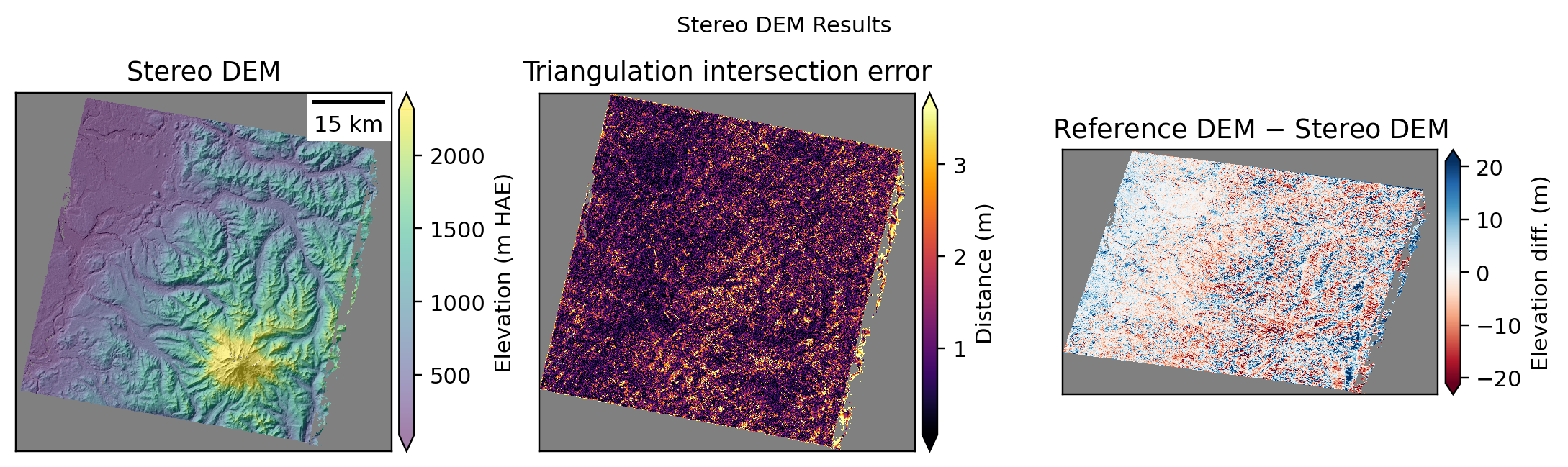
The results of this jitter solved output are displayed below.
Stereo Results#
directory = "~/Desktop/asp-plot-examples/aster_jitter/"
stereo_directory = "stereo_mgm_jitter_solved/"
reference_dem = f"{directory}ref.tif"
plotter = StereoPlotter(
  directory,
  stereo_directory,
  reference_dem=reference_dem,
  dem_gsd=30,
)

plotter.title = "Stereo DEM Results"

plotter.plot_dem_results()
WARNING:asp_plot.utils:Could not find ('*-align-L.txt',) in /Users/ben/Desktop/asp-plot-examples/aster_jitter/stereo_mgm_jitter_solved/. Some plots may be missing.
WARNING:asp_plot.utils:Could not find ('*-align-R.txt',) in /Users/ben/Desktop/asp-plot-examples/aster_jitter/stereo_mgm_jitter_solved/. Some plots may be missing.
Reference DEM: /Users/ben/Desktop/asp-plot-examples/aster_jitter/ref.tif


ASP DEM: /Users/ben/Desktop/asp-plot-examples/aster_jitter/stereo_mgm_jitter_solved/run-DEM_30m.tif

Plotting DEM results. This can take a minute for large inputs.
WARNING:asp_plot.stereo:

Found a DEM of difference: /Users/ben/Desktop/asp-plot-examples/aster_jitter/stereo_mgm_jitter_solved/run-DEM_30m_ref_diff.tif.
Using that for difference map plotting.
ICESat-2 Altimetry Validation#
import contextily as ctx
from asp_plot.altimetry import Altimetry
map_crs = "EPSG:32610"

ctx_kwargs = {
    "crs": map_crs,
    "source": ctx.providers.Esri.WorldImagery,
    "attribution_size": 0,
    "alpha": 0.5,
}
icesat = Altimetry(
  directory=directory,
  dem_fn=plotter.dem_fn
)
icesat.request_atl06sr_multi_processing(
    processing_levels=["all"],
    save_to_parquet=True,
)
Time filter: 2018-10-14T00:00:00Z to 2026-04-14T00:00:00Z (all available)

ICESat-2 ATL06 request processing for: all
{'poly': [{'lon': -122.36648676044332, 'lat': 46.68467686575204}, {'lon': -122.36648676044332, 'lat': 47.363787417455434}, {'lon': -121.32622773402014, 'lat': 47.363787417455434}, {'lon': -121.32622773402014, 'lat': 46.68467686575204}, {'lon': -122.36648676044332, 'lat': 46.68467686575204}], 't0': '2018-10-14T00:00:00Z', 't1': '2026-04-14T00:00:00Z', 'res': 20, 'len': 40, 'ats': 20, 'fit': {'maxi': 6}, 'cnf': 'atl03_high', 'srt': -1, 'cnt': 10}
Existing file found, reading in: /Users/ben/Desktop/asp-plot-examples/aster_jitter/atl06sr_all.parquet
Filtering ATL06-SR all
icesat.filter_esa_worldcover(filter_out="water")
No temporal filtering needed for the simplified report workflow. Advanced temporal filtering is still available via notebook/script method calls.
# Map view
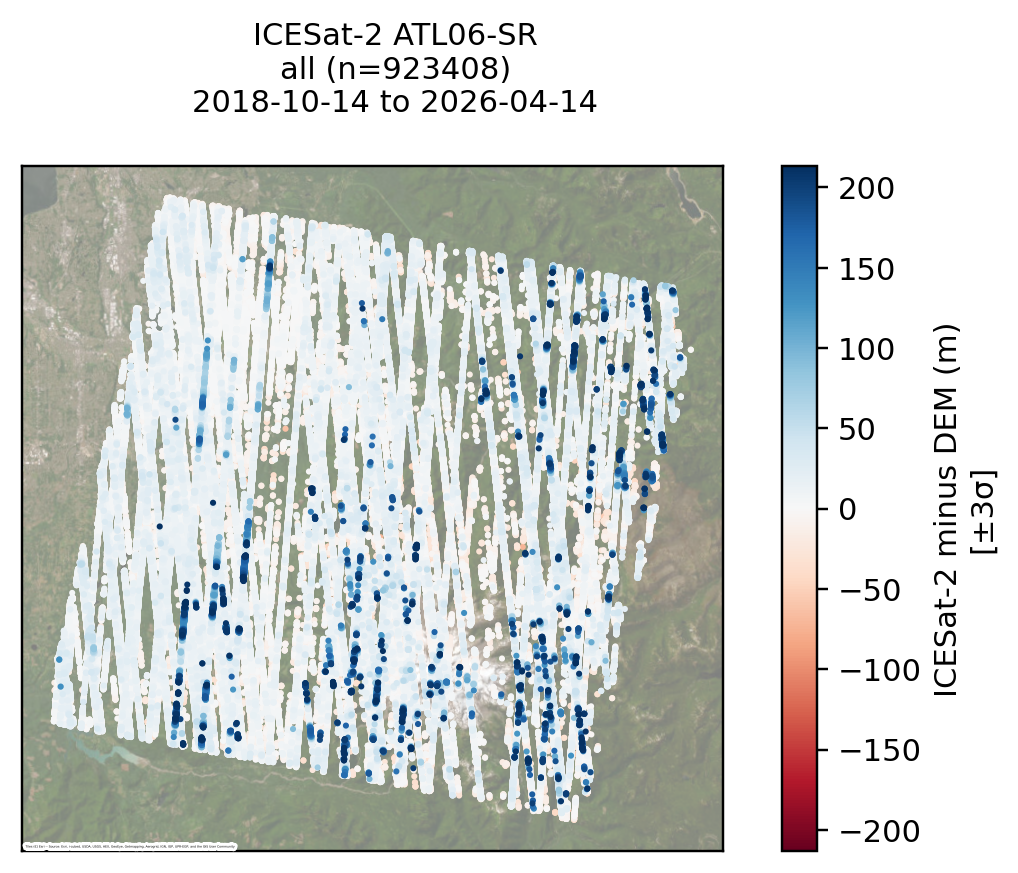
icesat.mapview_plot_atl06sr_to_dem(
    key="all",
    map_crs=map_crs,
    **ctx_kwargs,
)

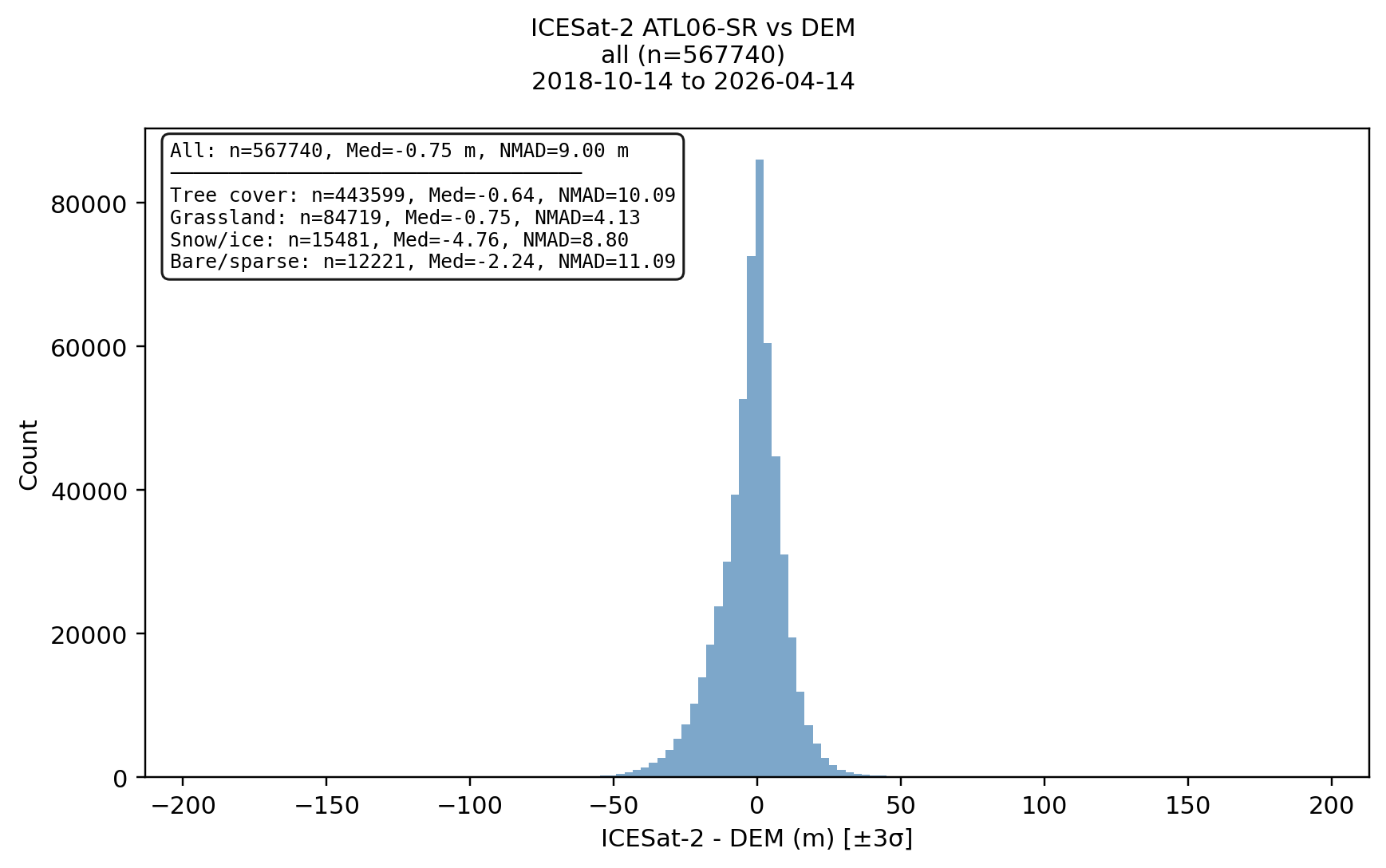
# Histogram with per-landcover-class statistics
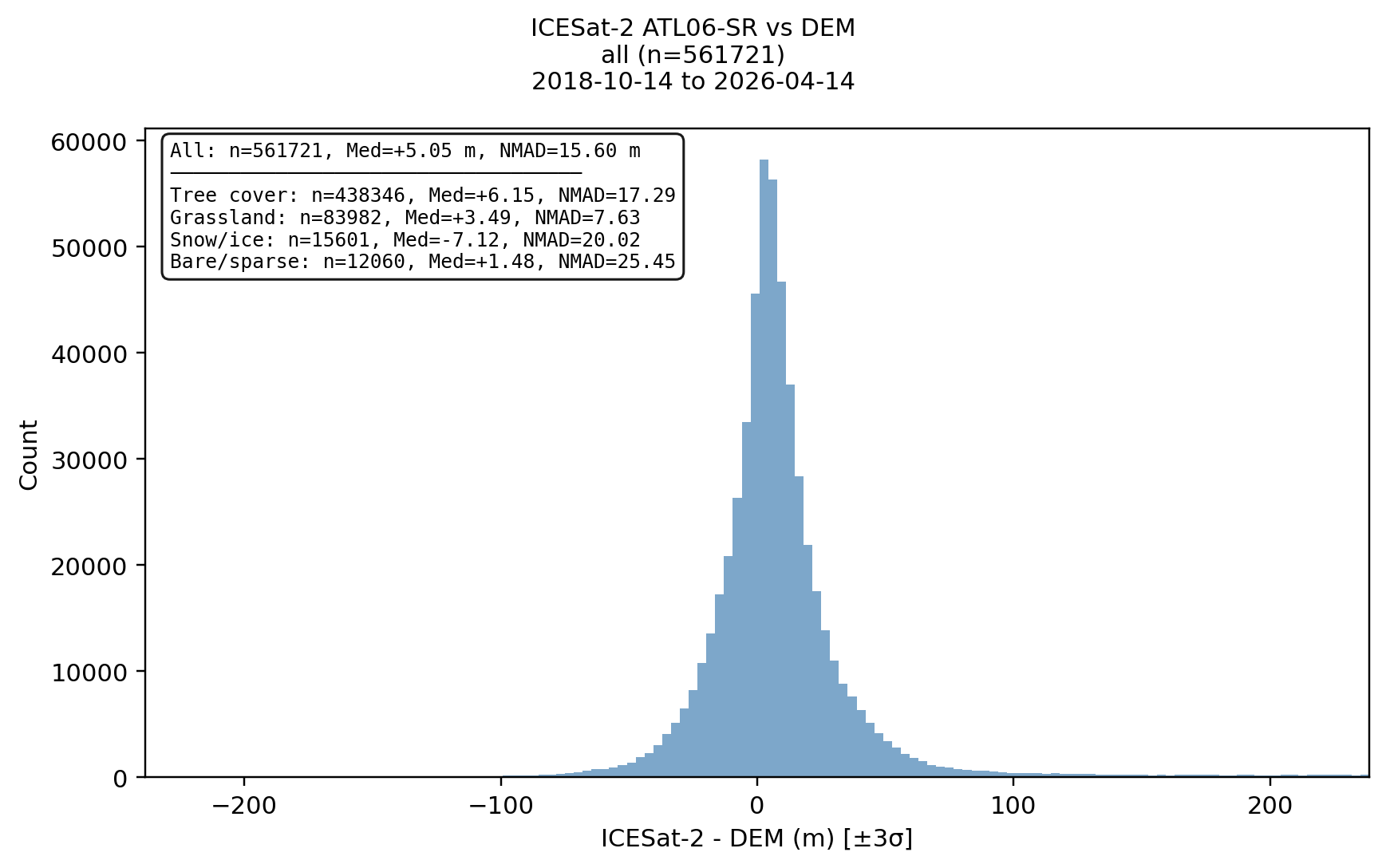
icesat.histogram_by_landcover(key="all")

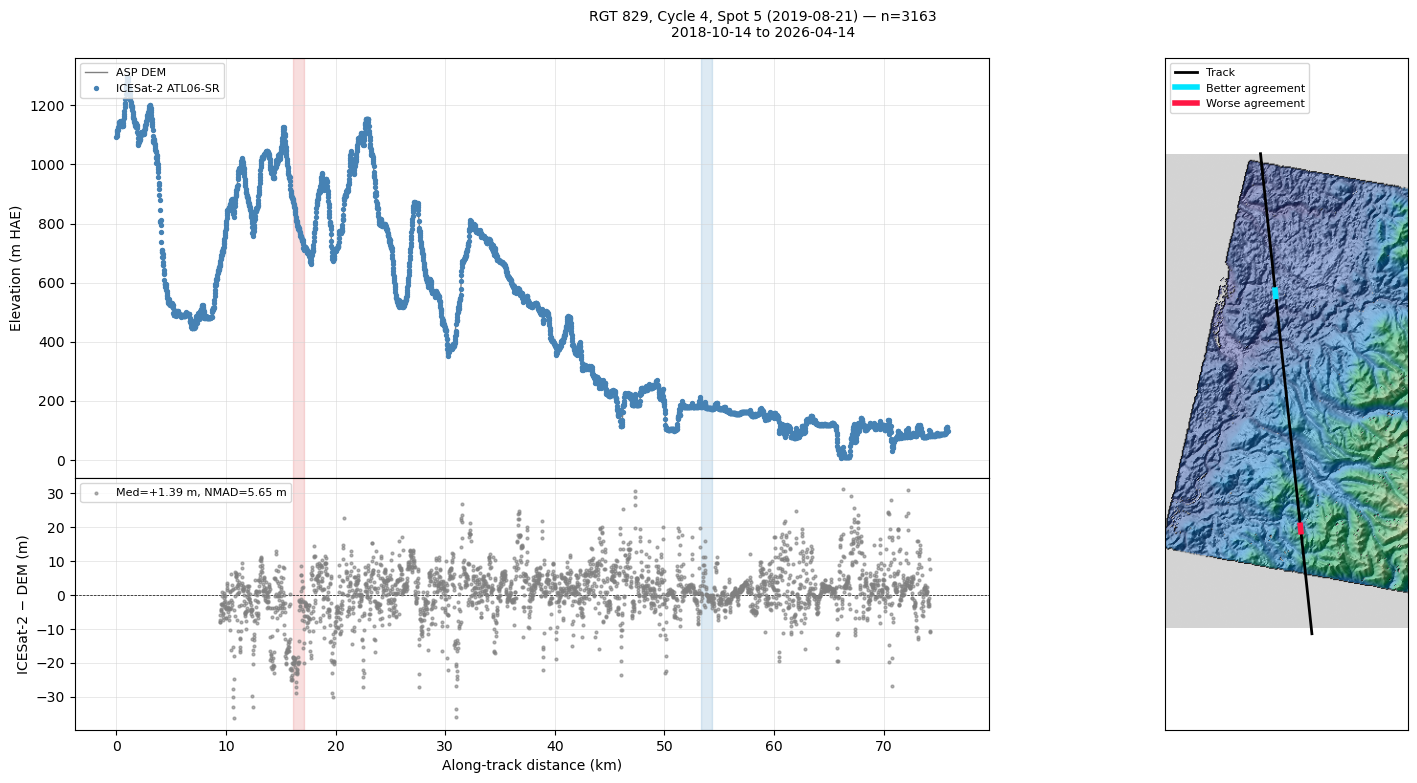
# Profile along the best ICESat-2 track
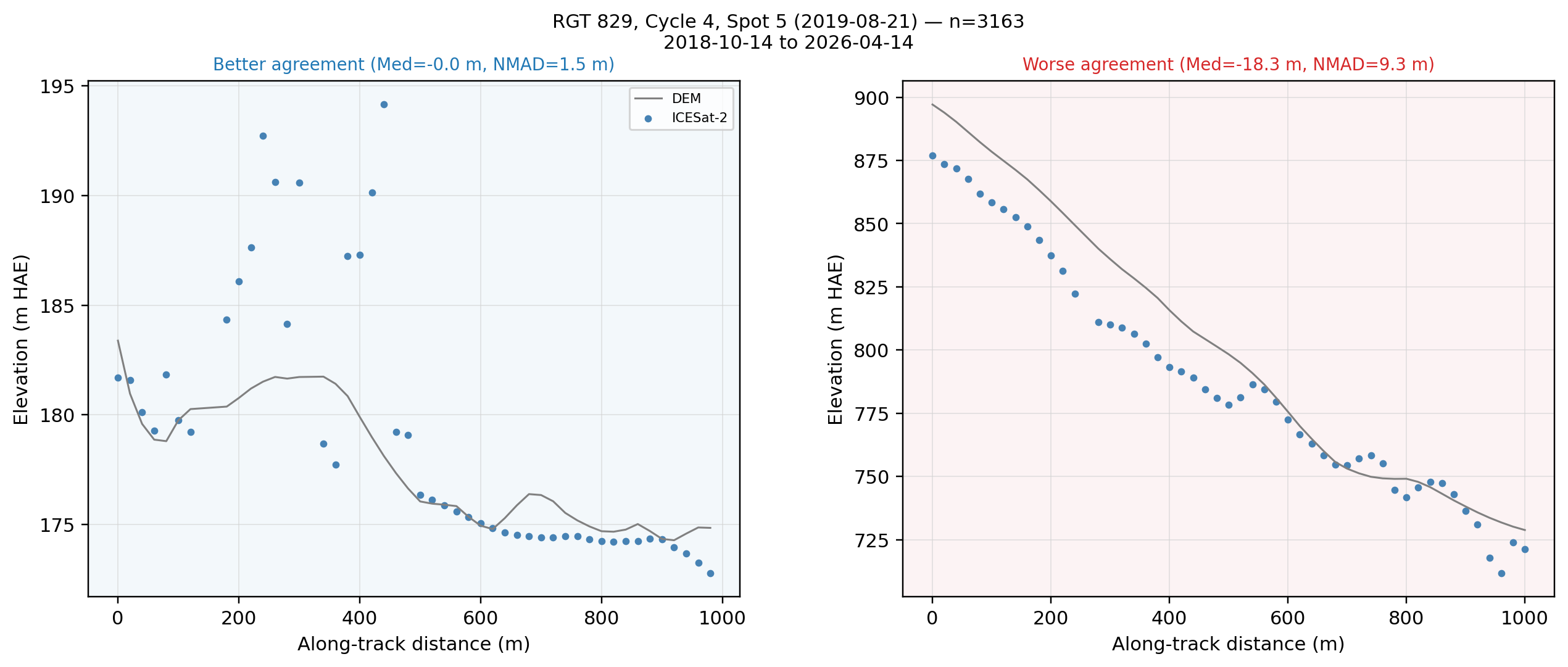
icesat.plot_atl06sr_dem_profile(key="all")
icesat.plot_best_worst_segments(key="all")
icesat_minus_dem not found in ATL06 dataframe: all. Running differencing first.

  Outlier filter (3σ): all 940213 → 923408 (removed 16805)
Compare with NO Jitter Solving#
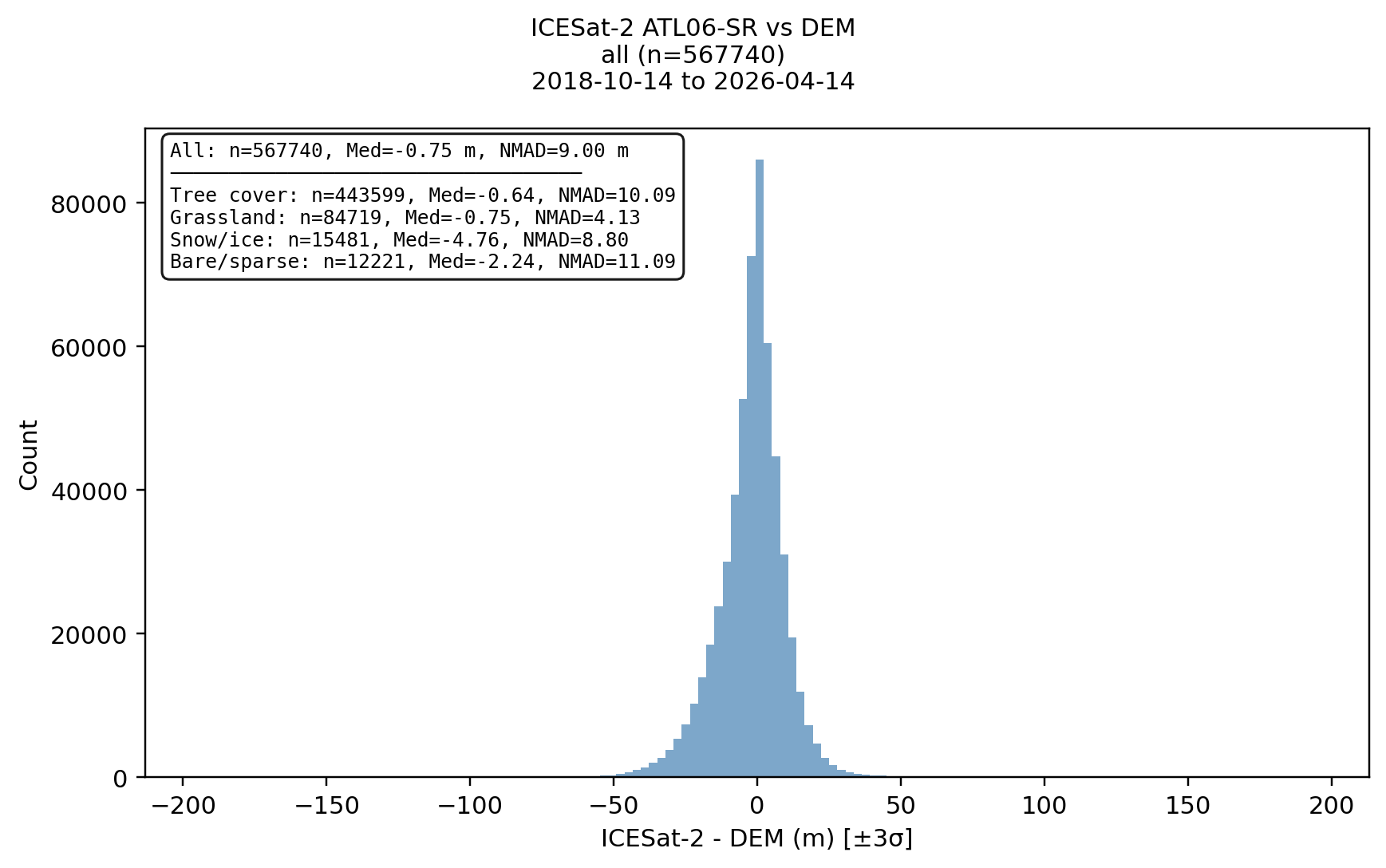
For reference, here is the ICESat histogram result for the same area with mapprojection but no jitter solving step. Note the reduction in Medium and NMAD with jitter solving applied:
Jitter Solve#
No Jitter Solve#